
No Spend Challenge Printable: Free One-Page Chart and PDF
Quick answer: Open the no spend challenge tracker, set the length, and press Print the paper grid. You get one page: the two lists ruled blank across the top, then every day of the run with a box for a clean day and a box for a slip. The same dialog saves it as a PDF. No email address, no download, no watermark.
Search for a no spend challenge printable and most of what comes back wants something first. A PDF behind a mailing list. A pin that ends at a shop. A chart with thirty-one squares and no idea when your month starts.
The sheet described here is made in your browser from the tracker you are already looking at. It costs one keystroke, it already knows your dates, and it prints the length you actually chose rather than the length somebody else designed for.
What the sheet actually looks like
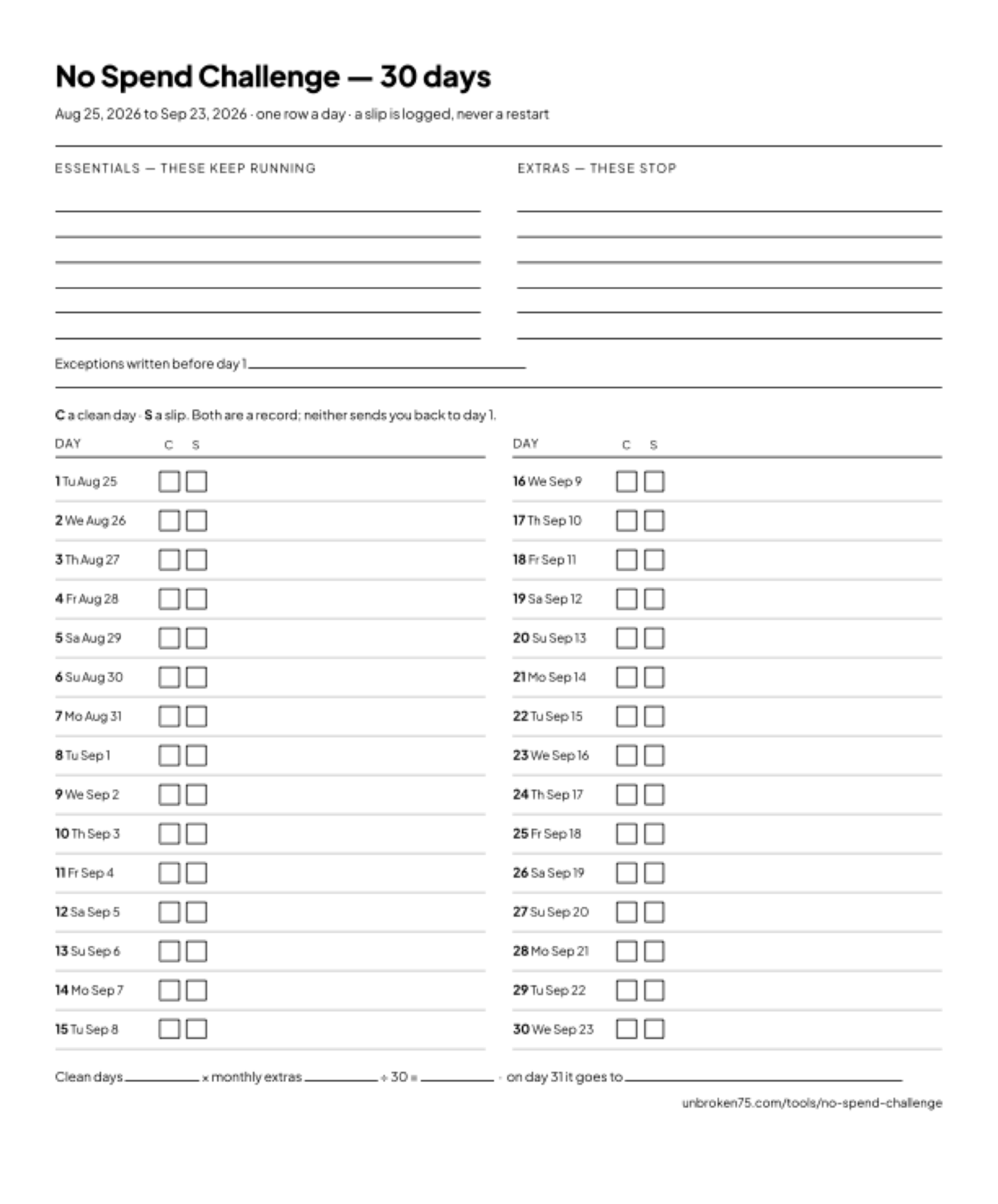 The sheet as it comes out of the browser: a thirty-day run, dates filled from the start date you set.
One page, top to bottom:
- The heading. No Spend Challenge, the length in days, and — once a run has started — the first and last date, so the sheet cannot be confused with last year's.
- Two lists, ruled and empty. Essentials — these keep running on the left, Extras — these stop on the right, six lines each, plus one line for the exceptions you agree before day 1.
- The key. C for a clean day, S for a slip. Both are a record, and neither sends you back to day 1.
- The grid. One row per day: the day number, its weekday and date, then the two boxes. A week prints as one column, a month as two, a season as three, a year as four.
- The total, unfilled. Clean days ___ × monthly extras ___ ÷ 30 = ___ , and then the line that decides whether any of it survives: on day 31 it goes to ___.
- The footer. The tracker's address, so whoever takes it off your fridge can find it.
Why the lists print blank
This is the part that looks like a missing feature and is not.
Which side of the line the corner shop sits on is the argument the challenge is made of. Groceries are essential; the sandwich from the same shop at 13:00 is not. A haircut in week three is maintenance or a treat, and only you know which. Fidelity's guidance is to set your exceptions in advance — a preplanned occasion, or an unexpected cost like replacing a broken laptop — and an exception written on day 0 is a rule, while one invented on day 11 is a negotiation.
A printable that fills those lists in has had that argument on your behalf and got it wrong, because it does not know you. So the lines are ruled and empty, and writing them is day zero's job. The full method is in the no spend challenge rules.
Two boxes, not one
Most spending charts give you one box a day and expect a tick. That works right up until the day you spend, and then the sheet has nowhere to put the truth, so the truth goes nowhere.
Two boxes fixes it. A clean day gets the C, a slip gets the S, and an empty row is a day you never answered — which is its own information, and not the same thing as a day you spent. At the end you count the Cs against the rows you filled, and that ratio is the only number worth carrying into next month.
Recording it is not decoration. A meta-analysis of 138 experiments with 19,951 participants found that prompting people to monitor progress toward a goal improved whether they reached it, with larger effects when the information was physically recorded. Physically recorded is exactly what a sheet on a wall is.
Where the printable is the wrong tool
Paper is furniture. It sits where you already stand, it needs no battery, and nobody has to open an app to see how the month is going. That is its whole advantage and it is a real one.
It is the wrong tool for the arithmetic. A paper chart will never tell you your clean-day ratio, your current streak, or what the month is worth at your own figure — you would be adding that up by hand on day 31, which is the day people stop. On that one job a spreadsheet is better at counting the days at the end: three columns, date, clean or slip, note, one COUNTIF for the Cs and a cell multiplying them by your monthly extras divided by thirty.
The no spend challenge tracker does that arithmetic as you go and prints the paper as well, which is the honest answer to "printable or app": use both, for the two different jobs. The savings line is an estimate built from an estimate — your own monthly figure divided by thirty, times your clean days — and the page says so rather than pretending it can see your bank.
For scale rather than a promise: the U.S. Bureau of Labor Statistics puts the 2024 average household at $3,945 on food away from home and $3,609 on entertainment, about $630 a month between them. Averages across all households, not your numbers, and not all of it cuttable — but it says the discretionary column is measured in hundreds a month, which is why thirty days of mild inconvenience is worth a sheet of paper.
Printing it before day 1, and printing it for a year
You do not need a run in progress. Open the tracker, choose the length, and print — the rows come out numbered, the start date is a blank line, and the sheet is a form. That is the version to take to the kitchen table when two of you are agreeing one list.
Length changes the shape rather than the content. Seven days is one column and a lot of white space for notes. Thirty is two columns and one sheet. A no-buy year is 365 rows in four columns and will run to more than one page, which is worth knowing before you press print — and worth reconsidering, because a year is better run as five or six category rules than as 365 identical boxes.
The same trick works on the rest of this site: the winter arc printable and the 75 Soft printable are the same sheet in a different program's rules.
Frequently Asked Questions
Is there a free no spend challenge printable?
Yes. Open the no spend challenge tracker, set the length, and press "Print the paper grid". You get a one-page chart with the two lists ruled blank at the top and every day of your run below, each with a clean box and a slip box. There is no email form, no download and no watermark.
How do I get the no spend challenge tracker as a PDF?
Press "Print the paper grid" and choose "Save as PDF" as the destination in your browser's print dialog instead of a printer. It is the same sheet and the same button — the PDF is made by your browser, so nothing is downloaded from us.
Why does the printable leave the essentials list empty?
Because that list is the challenge. Whether the corner shop, a haircut or somebody else's wedding counts as essential is yours to decide before day 1, and a template that decides it for you has guessed. The sheet gives you six ruled lines per column and one for the exceptions you agree in advance.
Is a printable better than a no spend challenge spreadsheet?
For the daily marking, paper wins: it is on the wall where you already stand and it never waits for a phone to unlock. A spreadsheet is better at counting the days at the end — the clean-day ratio and the savings estimate. The tracker does both, so the sheet on the wall and the arithmetic on screen are the same run.
Can I print a no spend chart before the challenge starts?
Yes, and it is worth doing. With no run in progress the rows print as bare day numbers and the start date is a blank line, so the sheet becomes a form to fill in by hand. It is the version to use when two people are agreeing one set of rules.
What length should the printable be for a January no spend challenge?
Thirty-one days if you are running the calendar month, thirty if you just want the standard length. Set it on the tracker before printing and the sheet matches — the grid is built from the length you chose, not from a fixed template.