
75 Soft Printable: Free One-Page Tracker PDF
Quick answer: Open the 75 Soft tracker, set your start date, and press Print the paper grid. You get one page: the four rules across the top, then all 75 days with the real dates beside them and four boxes to tick. The same dialog saves it as a PDF. Nothing to download, no email address, no watermark.
Most "75 Soft printable" results want something from you first. A file behind an email form, a Pinterest pin that leads to a shop, a PDF sized for letter paper that cuts off the last five days on A4. The sheet described here is generated in your browser from the tracker you are already looking at, so it costs one keystroke and it already knows what today is.
Here is what is on it, how to get it, and where paper genuinely beats a spreadsheet — and where it does not.
What the sheet actually looks like
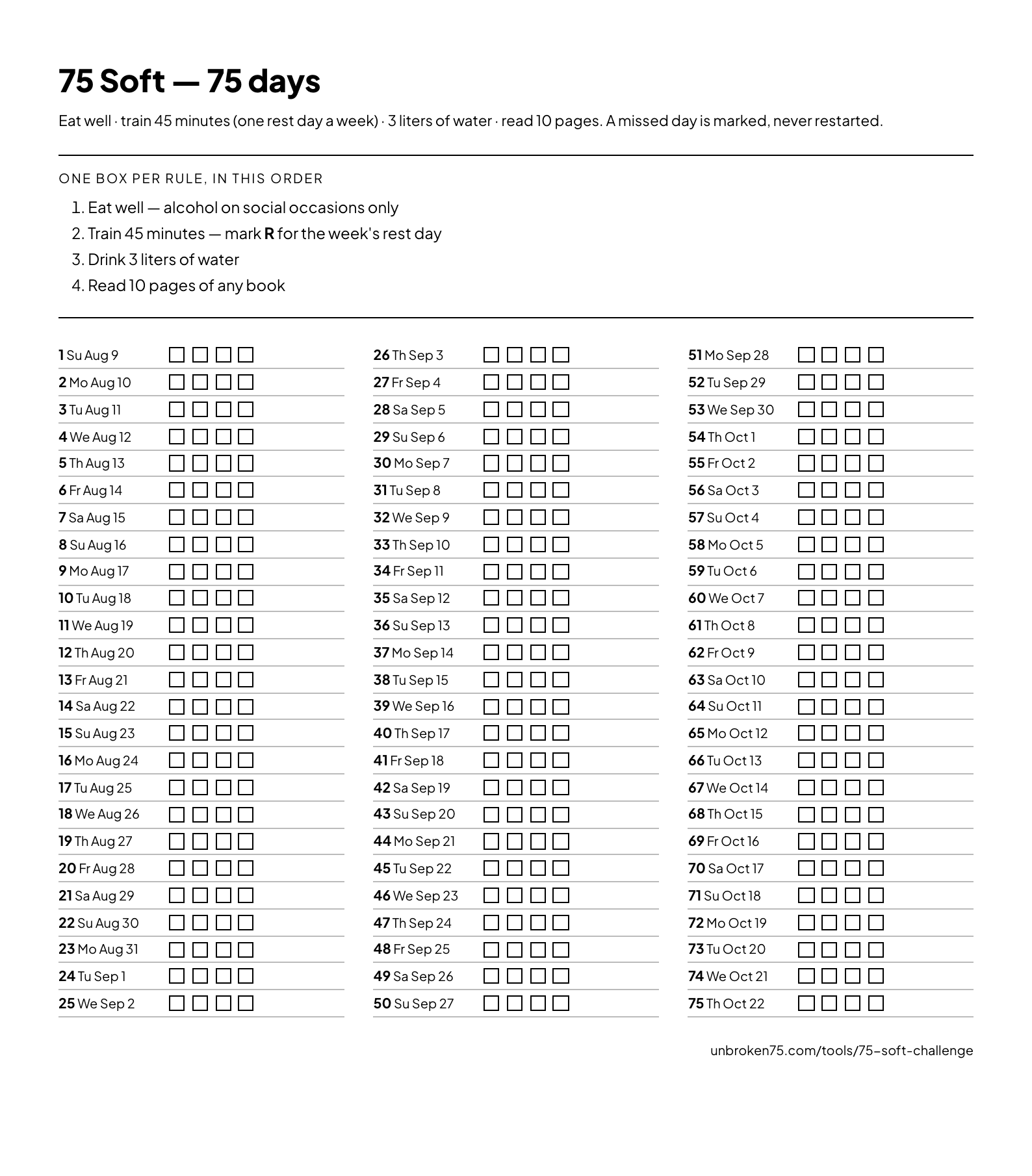 The printable, as it comes out of the browser. Three columns of 25 days, dates filled from the start date you set.
Top to bottom, it holds four things:
- The title and the deal. "75 Soft — 75 days", and one line stating the rules and the fact that a missed day is marked rather than restarted. It matters on a shared fridge: anybody who reads the sheet knows what you signed up for.
- The four rules, numbered. Eat well, alcohol on social occasions only. Train 45 minutes, with R marking the week's rest day. Three liters of water. Ten pages of any book. The numbers match the box order, which is the only instruction the sheet needs.
- All 75 days, in three columns of 25. Each row is the day number in bold, then the weekday and date — "12 Th Aug 20" — then four empty boxes.
- One line of small print at the bottom with the address the sheet came from, so a photo of it on a group chat is still traceable to the rules.
That is the whole page. No motivational quote, no habit-tracker curlicues, no space for a "reflection". Every millimeter that is not a date or a box is wasted on a wall.
How to print it, or save it as a PDF
Four steps, and the third is the one people miss.
- Open the 75 Soft challenge tracker.
- Set your start date and press Begin Day 1. Skip this and the sheet still prints — it just shows bare day numbers instead of real dates.
- Press Print the paper grid, near the bottom of the page.
- In the print dialog, choose your printer — or choose Save as PDF in the destination list. Same sheet, same layout, a file instead of paper.
The layout is set in millimeters and sized to fit one page on both A4 and US Letter, so no scaling is needed. If your dialog offers "Headers and footers", turn it off: the browser's own URL line at the top of the page is the only thing that can push the last column onto a second sheet.
Dated beats blank, every time
A blank grid numbered 1 to 75 is a grid you have to do arithmetic on. On day 41 you will not know whether the run ends on a Tuesday, and you will not notice that day 58 lands on the wedding you agreed to in April.
The dated version answers both questions on the wall, in advance. It is also the version that catches the scheduling problem while it is still cheap — which is the same reason the start date calculator exists for the stricter programs. Set the date before you print.
Printable or spreadsheet: the honest comparison
Plenty of people run 75 Soft in Google Sheets or Excel, and for some of them it is the right answer. It depends entirely on which part you find hard.
| Printed sheet | Spreadsheet | |
|---|---|---|
| Setup cost | One keystroke | 20–40 minutes to build the columns, dates and formatting |
| Ticking a day | A pen, on the wall you walk past | Unlock a device, find the tab, find today's row |
| Totals and percentages | Count by hand at the end | Automatic, and this is where a spreadsheet earns its keep |
| Rest-day arithmetic | Yours to remember | Yours to write a formula for |
| Survives a lost phone | Yes | Only if it is in the cloud |
| Editing yesterday | Visible — you can see the correction | Invisible, and that is the problem |
The last row is the one worth sitting with. A spreadsheet cell is trivially rewritable and leaves no trace, so a bad Tuesday in week three can quietly become a good one in week seven. Paper is not tamper-proof either, but a scribbled-over box is a scribbled-over box. You can see it. So can anyone else in the kitchen.
The honest summary: paper is better at getting the day ticked, a spreadsheet is better at counting the days at the end. If you want both without building either, the tracker keeps the running count on screen — held days, missed days and whether this week's rest day is spent — and prints the paper version from the same page.
Where the printable is the wrong tool
Three cases, said plainly:
- You want the rest-day rule enforced. 75 Soft allows one training rest day a week, and paper cannot stop you taking a second. The on-screen tracker will not let you bank two in the same week.
- You travel. A sheet on the fridge is a sheet you are not standing in front of. Photograph it before you go, or run the days on screen while you are away.
- You want the run counted for you. Sixty-eight held, four rest, three missed is a number the sheet will not give you until you sit down and count. That is the one job the screen does better every time.
Why one page, and not one page per week
Weekly sheets are common and they hide the thing you most need to see. Seventy-five days across three columns puts the entire run in a single glance: the good stretch in week two, the ugly patch in the middle of week five, and how far there is left to go.
That visibility does real work. 75 Soft has no restart rule — WebMD's write-up of the challenge describes it as the gentler alternative to 75 Hard, and the published 75 Hard program information is explicit that missing a task there sends you back to Day 1. Without that penalty, the only thing keeping a soft run honest is how obvious the gaps are. A wall of ticks with four holes in it is an argument. Twelve loose weekly sheets in a drawer are not.
The forgiveness is well earned, incidentally. Work on daily repetition found that "missing the occasional opportunity to perform the behaviour did not seriously impair the habit formation process: automaticity gains soon resumed after one missed performance." One hole does not undo eleven weeks. Eleven holes are a different run, and you should be able to see which one you are having.
Print it, then decide where the record lives
The sheet is free, it takes a second, and it is worth having on the wall even if you also track on screen. What it cannot do is count for you, hold you to the rest-day rule, or put your run in front of anybody else.
Unbroken does that part: a fixed-length pact, the same daily list, and a squad running it on the same board — where a missed day is visible to people who will ask about it. Print the paper for the wall, and keep the record somewhere it cannot be quietly rewritten.
If you are still choosing between programs, 75 Hard vs 75 Soft settles it on the failure rule rather than the workload. If you want the same paper treatment for the strict version, that is in 75 Hard template: printable, Google Sheets and Notion compared.
Frequently Asked Questions
Is there a free 75 Soft printable?
Yes. The 75 Soft tracker generates one in your browser: press "Print the paper grid" and you get a single page with the four rules at the top and all 75 days below, four tick boxes a day. There is no download, no sign-up and no email address to hand over.
How do I get the 75 Soft tracker as a PDF?
Press "Print the paper grid", then in your browser's print dialog change the destination from your printer to "Save as PDF" — Chrome, Edge, Safari and Firefox all offer it. The file is identical to the printed page. Set your start date first if you want the dates filled in.
Does the 75 Soft printable have the dates on it?
It does once you have set a start date on the tracker. Each row reads as the day number, the weekday and the date — day 12, Thursday, August 20 — so you can see which weekend day 40 lands on before you commit. Without a start date the sheet still prints, with bare day numbers 1 to 75 to date by hand.
What size paper does it print on?
One page on both A4 and US Letter. The layout is measured in millimeters with a 12mm margin, so no scaling is needed. If a column spills onto a second page, turn off "Headers and footers" in the print dialog.
Is a printable better than a 75 Soft spreadsheet?
For ticking the day, yes: it is on the wall you already walk past, and it needs no device. For totaling the run at the end, a spreadsheet is better, because it counts. The tracker gives you both — the paper sheet for the wall, and a live count of held days, rest days and misses on screen.
What are the four 75 Soft rules on the sheet?
Eat well and drink alcohol only on social occasions; train 45 minutes a day with one rest day a week; drink three liters of water; read ten pages of any book, fiction included. It runs 75 consecutive days, and a missed day is recorded rather than restarted. The full task-by-task comparison with the strict version is in 75 Hard vs 75 Soft.
Can I print a blank 75 Soft tracker to fill in by hand?
Yes — print before you press "Begin Day 1" and the sheet comes out with day numbers and empty boxes, no dates. That is the version to use if you are printing a stack for other people, or if you have not settled on a start date yet.