
75 Hard Template: Printable, Google Sheets, and Notion Compared
Quick answer: A 75 Hard template needs six boxes a day for 75 days — 450 of them — plus the dates and a way to record the restart. The fastest version is the printable one-pager the 75 Hard tracker generates: one keystroke, no build. Google Sheets is worth it if you want totals; Notion is worth it if you already live there. None of the three handle a restart without you re-dating the whole thing by hand.
Search "75 Hard template" and you land in a market of Notion pages, Etsy spreadsheets and Sheets copies. Some are good. All of them are the same object underneath, and it is worth knowing what that object has to do before you pay for one or spend an evening building it.
75 Hard is a registered trademark of its owner. Unbroken is an independent app and is not affiliated with the program or endorsed by it. This is a practical guide to tracking it.
What a 75 Hard template actually has to hold
Five published rules, six boxes. The official program information lists two 45-minute workouts with one outdoors, a diet with no alcohol and no cheat meals, a gallon of water, ten pages of non-fiction and a daily progress photo — and the two workouts are separate sessions, so any honest template logs them separately.
That gives you the arithmetic:
- 6 boxes × 75 days = 450 ticks, all of which must land before midnight on their own day.
- 75 dated rows, because "day 34" means nothing on a Tuesday in March unless the date is beside it.
- A completion rule: a day counts only when all six are done. Five out of six is a zero, not an 83%.
- A restart record, because the program's own rules send you back to Day 1 on any miss. That is not a footnote — it is the single hardest thing to represent, and it is where every template design either works or quietly gives up.
Anything that does not carry all four is a checklist, not a tracker. The full rulebook, including the midnight boundary and the arguments about what counts as a workout, is in the 75 Hard rules explained.
Option 1: the printable one-pager
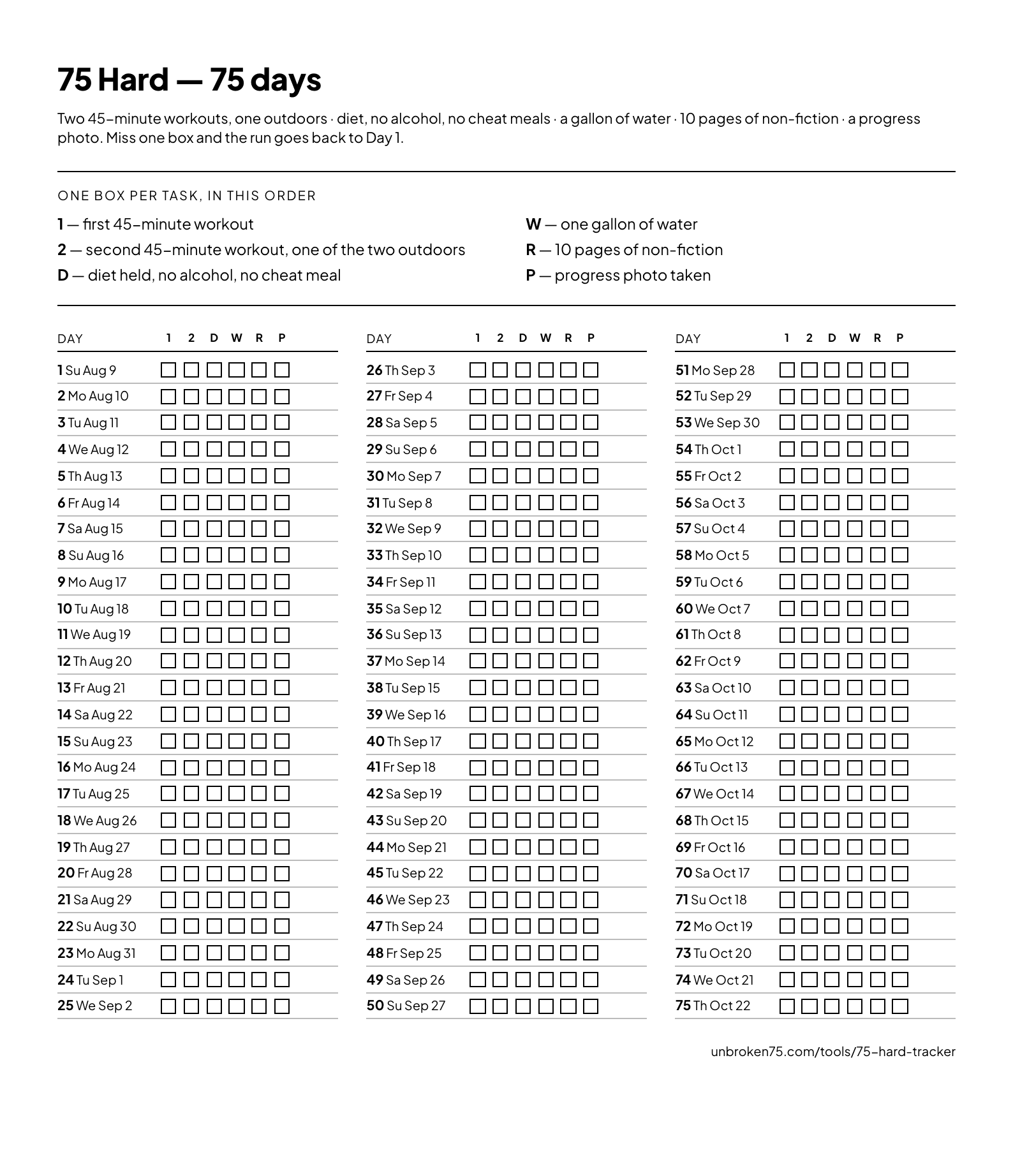 The printed sheet, as it comes out of the browser: three columns of 25 days, six boxes each, dated from your start date.
Open the 75 Hard tracker, start a run so the sheet knows your dates, and press Print the paper grid. You get one page: the six tasks numbered at the top with the letter that marks each column, then all 75 days in three columns of 25, each row carrying the day number, the weekday, the date and six empty boxes. The same dialog saves it as a PDF.
What it is good at. Nothing to build and nothing to buy. It lives on the wall you walk past at 11pm, which is when the fifth and sixth boxes are usually decided. It cannot run out of battery, and a photo of it on a group chat is a perfectly good progress report.
What it is bad at. It counts nothing. It cannot stop you back-filling three days on Sunday. And when the restart comes, the sheet is dead paper — the dates on it are wrong from that morning on, and you print a new one.
It fits A4 and US Letter without scaling. If a column spills, turn off "Headers and footers" in the print dialog.
What it does not carry is the rules themselves — the sheet numbers the six columns and assumes you know what they stand for by week three. If what you actually want on the wall is the rulebook rather than the grid, the 75 Hard rules printable is a second one-page sheet: the five published rules and both structural rules, set large, with a line to sign.
Option 2: building it in Google Sheets
Worth an evening if you want the numbers at the end. Here is the structure that works, so you can build it rather than hunt for a download.
The sheet. One row per day, 75 rows plus a header. Columns:
| A | B | C | D | E | F | G | H | I |
|---|---|---|---|---|---|---|---|---|
| Day | Date | Workout 1 | Workout 2 | Diet | Water | Read | Photo | Done |
The dates. Put your start date in B2, then =B2+1 in B3 and drag it down to B76. Format the column as a date and the whole calendar fills itself. This is also the column you scan before you commit — if day 58 lands on a wedding, you want to know in week one.
The boxes. Select C2:H76 and insert checkboxes from Insert → Checkbox; Google's own help page covers adding and using checkboxes. A checkbox cell is TRUE or FALSE, which is what makes the next column possible.
The day column. In I2, =IF(COUNTIF(C2:H2,TRUE)=6,1,0). That is the completion rule stated once: six of six, or nothing. Sum column I for days held.
The color. Select A2:I76 and add a conditional-formatting rule using a custom formula — =$I2=1 for green, =AND($B2<TODAY(),$I2=0) for red. Google documents the custom-formula rules this needs. The second rule is the important one: it paints a day red only once it is in the past, so today's unfinished row does not look like a failure at nine in the morning.
Where it hurts. The restart. When you miss on day 34, the honest move is a fresh copy of the tab with a new start date — 75 new dates, 450 empty boxes, and last month's tab left sitting there. People do not do that. They clear a few cells instead, and a spreadsheet cell rewritten in week seven leaves no evidence that week three ever happened. That is the whole reason the restart rule exists, undone by the tool.
Option 3: building it in Notion
The right answer if your reading list, your training log and your notes are already there.
The build. One database, Notion's own primitive, with a Date property and six Checkbox properties — Workout 1, Workout 2, Diet, Water, Read, Photo. Add a Formula property for the day itself: an if over the six checkboxes that returns 1 only when all six are checked. Notion's formula documentation covers the syntax, which changes between versions often enough that copying someone's 2023 template is a bad idea.
The views. Calendar view is the reason to do this in Notion at all — 75 days as an actual month grid, with the holes where they fall. Keep a table view for entry and a board grouped by the formula if you like a running tally.
The daily entry. A database template button so a new day arrives with the six checkboxes already on it, rather than being built from scratch every evening at 11:50pm.
Where it hurts. Same place, plus one. The restart problem is identical — a new run means 75 new dated rows, and nothing stops you editing an old one. The extra cost is friction: six taps inside an app that takes a moment to load, at the exact time of night when the honest answer is "I will do it tomorrow". Notion is a filing cabinet that happens to have checkboxes. It is not built to be opened in a hurry.
The three, side by side
| Printable | Google Sheets | Notion | |
|---|---|---|---|
| Time to set up | Seconds | 20–40 minutes | 30–60 minutes |
| Counts your days | No | Yes | Yes, with a formula |
| Works with no signal | Yes | Only offline-enabled | Poorly |
| Speed to tick one box | Instant | Medium | Slowest |
| Shows the whole run at a glance | Yes | Yes | Calendar view |
| Handles a restart | Reprint | Rebuild the tab | Rebuild the rows |
| Can yesterday be rewritten? | Visibly | Silently | Silently |
| Anyone else sees it | Only if it is on your fridge | Only if you share the link | Only if you share the page |
The thing no template does: the restart
Every option above is a container. The program is not a container — it is a rule, and the rule is that any miss returns you to Day 1. The published program information is unambiguous about it, and what is 75 Hard frames the whole thing as a mental-toughness test rather than a fitness plan for exactly that reason.
A template cannot enforce a rule. It can only record what you tell it. So the restart lands on you as bookkeeping — re-date 75 rows, archive the old tab, remember on day 12 of the new run that this is your third attempt — and bookkeeping is what people stop doing first. The quiet failure mode of every 75 Hard spreadsheet is not a dramatic quit. It is a run that was restarted twice and now claims to be on day 60.
That is the one job a live tracker does that a template cannot: the 75 Hard tracker works out the current day from your start date, notices when a day went by unfinished, and puts the restart in front of you instead of waiting to be told. There is nothing to re-date. And if a restart is where you are right now, what a restart actually costs is worth ten minutes before you decide anything.
Which one to use
- You want it on the wall and you want it now. Print the sheet. It is free, it takes one keystroke, and it is the version most likely to still be in use on day 40.
- You want numbers at the end. Build the Sheets version, and build the
COUNTIFcolumn properly. Copying a stranger's template usually costs longer than building your own, because you spend the time reading their formulas instead of writing yours. - You already live in Notion. Build it there, but add the template button. A daily log that takes six taps to create does not survive week three.
- You want the restart handled and somebody else to notice. That is not a template. Unbroken runs the pact on a squad's shared board — the same daily list, the same midnight deadline, and every held and missed day on a record nobody can quietly rewrite.
If it is the gentler program you are tracking, the same paper treatment is in the 75 Soft printable, and the two programs are compared task by task in 75 Hard vs 75 Soft. Before you fix a start date, run it through the 75 Hard date calculator — most runs are lost to a date somebody else picked.
Frequently Asked Questions
Is there a free 75 Hard template?
Yes. The 75 Hard tracker prints one: press "Print the paper grid" and you get a single page with the six tasks at the top and all 75 days below, six boxes and a real date on each row. There is no download, no email address and no charge, and the same print dialog saves it as a PDF.
How do I make a 75 Hard tracker in Google Sheets?
One row per day for 75 rows. Column A is the day number, column B the date — put your start date in B2 and =B2+1 below it — then six checkbox columns for the two workouts, diet, water, reading and the photo. Add a completion column with =IF(COUNTIF(C2:H2,TRUE)=6,1,0), and conditional formatting with the custom formulas =$I2=1 for green and =AND($B2<TODAY(),$I2=0) for red.
What should a 75 Hard Notion template contain?
One database with a Date property and six checkbox properties — workout 1, workout 2, diet, water, reading, photo — plus a formula property that returns 1 only when all six are checked. Add a calendar view to see the whole run, and a database template button so each new day arrives pre-built. Check the formula syntax against Notion's current documentation rather than copying an old template.
Is a spreadsheet or a printable better for 75 Hard?
The printable is better at getting the box ticked, because it is on the wall and needs no device. The spreadsheet is better at counting the run at the end. Neither handles the restart rule, which is the part that decides most attempts — a live tracker does that, by working the current day out from your start date rather than from what you remember.
How many checkboxes does a 75 Hard template need?
Four hundred and fifty. Six tasks a day for 75 days, because the two 45-minute workouts are separate sessions and have to be logged separately. Plus 75 dates and one completion rule per day: all six, or the day does not count.
What happens to my template when I have to restart?
Nothing automatic, which is the problem. On paper you print a fresh sheet. In Sheets or Notion the honest move is a new tab or a new set of 75 dated rows with the old attempt archived beside it — and because that is tedious, most people clear a few cells instead and lose the record of what happened. If the restart matters to you, keep the record somewhere it cannot be silently rewritten.
Can I use a 75 Hard template for 75 Soft?
Not directly. 75 Soft has four rules rather than six, allows one training rest day a week, and does not restart on a miss — so the completion formula and the color rules are different. The printable for that version is at 75 Soft printable.